Zone Chart Builder · Operations tool for a retail store
Less prep. Clearer floor planning.
I built a tool that turns schedule and roster data into a daily floor plan, with checks that flag missing information for review. I designed it, built it, and used it every day.
- Role
- Designed, built, used it
- Built with
- Excel · Office Scripts
- Used by
- 2–3 leaders, daily
- Result
- ~60 → ~30 min a day, my estimate
The independent demo, with fictional names and shifts. You can try it below. The real sheets stay inside the store.
Where it started
I made the floor chart myself, every day.
Before I could assign anyone, I had to organize the schedule export, match it against the roster, and check it for errors. That prep took the time that should have gone to deciding where people were needed.
Build where the work already happens
Store leaders already work in Excel, and it’s a tool their devices allow.
So the tool lives there too, written in Excel and Office Scripts. Nothing new to install and nothing new to learn.
From schedule data to a starting point
The tool prepares the information. The leader still makes every placement.
It pulls in the schedule and the roster, matches them, and flags anything that doesn’t add up. What comes out is a draft floor plan and a short list of issues to fix.
The checks came second
The first version just built the chart. The checks were the biggest change after it.
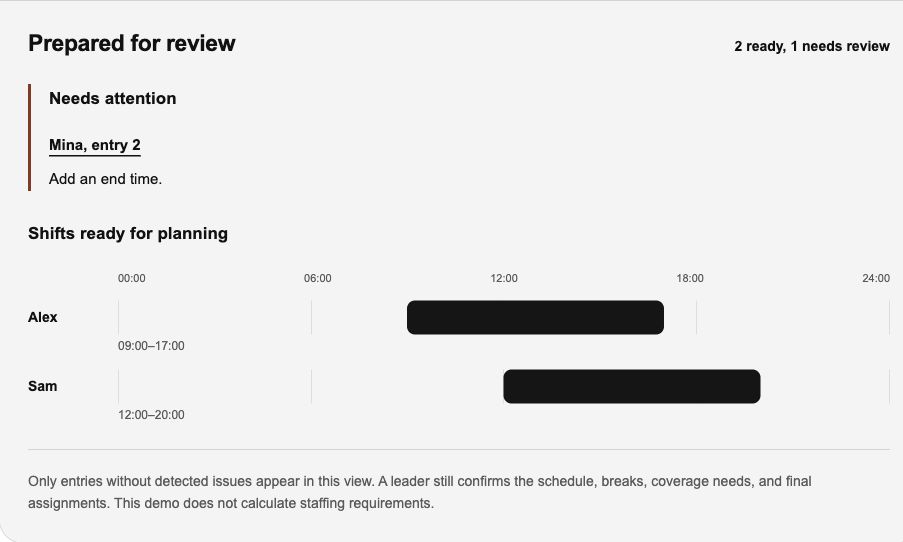
The tool now flags missing information for review before anything reaches the plan. Try the idea yourself below: Mina’s end time is missing. Prepare the draft to see the issue, then add 18:00 and prepare it again.
Sample schedule
Same day, 24-hour timePrepared for review
Only entries without detected issues appear in this view. A leader still confirms the schedule, breaks, coverage needs, and final assignments. This demo does not calculate staffing requirements.
Colour has one job per hue
A leader scans the sheet for problems under time pressure. So every colour has to mean something.
- Black is structure.Titles, headers and section bands.
- Orange is where you act.The cell to type in, the dropdown to pick, the next step.
- Signal colour is status only.Red is the only solid fill on a sheet, and it belongs to the gap. Everything else is a tint.
- The same thing looks the same everywhere.A break is the same yellow on every sheet, so nobody re-learns it between tabs.
| Zone | Target | 10:00 | 12:00 | 14:00 | 16:00 |
|---|---|---|---|---|---|
| Front | 3 | 3 | Break | 3 | 3 |
| Fitting rooms | 2 | 2 | 2 | 1 short | 2 |
| Stockroom | 1 | Closed | 1 | 1 | 1 |
The tool prepares. People decide.
It never places anyone on its own.
A leader still confirms the schedule, the breaks, the coverage needs and the final assignments. Leaving the call to people is the part I’d tell another designer to keep.
Outcome
Used daily in-store since August 2026 by two or three leaders, me included. Daily prep went from about an hour to about half an hour.
- Daily prep
- ~60 → ~30 min
- Leaders using it
- 2–3
- In daily use since
- Aug 2026
The time figures are my estimate, not a measured study.
What I’d tell another designer
Leave the call to people.